Kjell Karlsson

Our Procolored F8 Panda review covers real-world specs, pros & cons, inks, workflow, costs, and setup tips—so you can decide if this compact 8.2″ (A4) DTF fits your shop.
Procolored F8 Panda Review (A4 / 8.2″ Direct-to-Film Printer)

📋 Key Specifications — Procolored F8 Panda (A4)
| Manufacturer | Procolored |
| Printhead | L800 (single array) |
| Max Resolution | 1440 × 1400 dpi (8-pass) |
| Max Print Width | 8.2″ / 210 mm (A4 roll) |
| Quoted Speed | A4 ~7 min (mode-dependent) |
| Color Configuration | CMYK + WW (6 channels) |
| White Ink | Circulation/mixing; white & color simultaneous |
| Maintenance | Auto clean every 10 h if powered on (~1 ml/day) |
| OS / RIP | Windows only; “professional RIP” bundled |
| Footprint / Weight | ≈ 21 × 11 × 7 in; ~10 kg (compact) |
| Ink Usage (vendor est.) | ~10 sq ft per 20 ml (~1 m² / 20 ml) |
Specs from Procolored’s product/spec pages; roll support, A4 width, L800 head, resolution, speed, auto cleaning, Windows-only RIP, weight/size, and ink-use estimate. :contentReference[oaicite:1]{index=1}
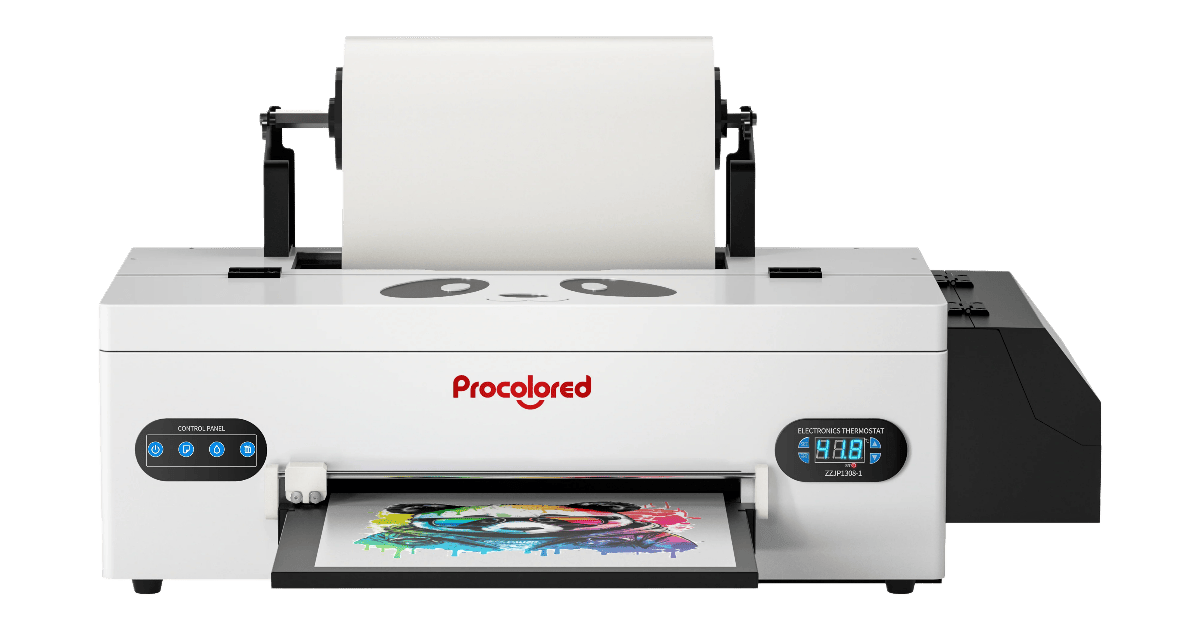
The F8 Panda focuses on accessibility: low entry cost, minimal footprint, and small-batch DTF on A4 rolls. Auto cleaning and white-circulation aim to reduce clogs, but throughput is modest and the workflow is Windows-only. :contentReference[oaicite:2]{index=2}
✅ Reasons to Buy
- Roll-feed A4 (210 mm) supports continuous gang sheets vs single-sheet A4. :contentReference[oaicite:3]{index=3}
- White-ink circulation + auto-clean every 10 h for stability. :contentReference[oaicite:4]{index=4}
- Small, ~10 kg body; ~21×11×7″ footprint. :contentReference[oaicite:5]{index=5}
- Beginner-friendly tutorials and included RIP (Windows). :contentReference[oaicite:6]{index=6}
❌ Reasons to Avoid
- Slow: around ~7 min per A4; limited for volume work. :contentReference[oaicite:7]{index=7}
- Windows-only workflow; Mac users need a PC. :contentReference[oaicite:8]{index=8}
- Entry-class pumps/circulation require attention; some third-party reviews flag reliability tuning. :contentReference[oaicite:9]{index=9}
🔍 Performance Analysis — Procolored F8 Panda review
The L800 single head can hit clean edges at 1440×1400 dpi with mainstream PET films, but throughput caps near one A4 every ~7 minutes in higher-quality passes. White mixing/circulation are must-haves at this size; they help keep the channel active between batches. Expect best results on small logos, chest prints, and labels rather than all-over designs. :contentReference[oaicite:10]{index=10}
🔗 Connectivity, RIP & Workflow — Procolored F8 Panda review
The bundled Windows RIP handles mirror/white logic and ICC support; pair the printer with an A4 shaker/oven to streamline powdering/curing. Standardize film presets and heater targets per SKU, and log ink/film usage to refine cost per print (Procolored’s own estimate is ~1 m² per 20 ml, but real use varies with coverage). :contentReference[oaicite:11]{index=11}
💰 Running Costs & Uptime — Procolored F8 Panda review
White coverage dominates cost. The auto-clean routine (every 10 h, ~1 ml/day if left on) and circulation limit clogs, but you should still run quick nozzle checks and keep RH at 40–60%. For weekend pauses, cap/flush per guide videos to avoid purges on Monday. :contentReference[oaicite:12]{index=12}
🎯 Who Should Buy It? — Procolored F8 Panda review
Pick the F8 Panda if you’re starting DTF, sell small runs, or need a portable A4 line for logos, names, and one-offs. If you regularly queue large gang sheets or dark-shirt backs, consider stepping up to 24–35″ devices with higher throughput.
❓ FAQs — Procolored F8 Panda review
How wide can it print?
Up to 8.2″ (210 mm) printable width on A4 roll film. :contentReference[oaicite:13]{index=13}
How fast is it?
Vendor lists about ~7 minutes per A4 page (mode-dependent). :contentReference[oaicite:14]{index=14}
Does it support Mac?
No—workflow and RIP are Windows-only per vendor pages. :contentReference[oaicite:15]{index=15}
How does automatic cleaning work?
If left powered on, the printer auto-cleans every 10 hours and uses roughly 1 ml ink per day, per Procolored. :contentReference[oaicite:16]{index=16}