Kjell Karlsson

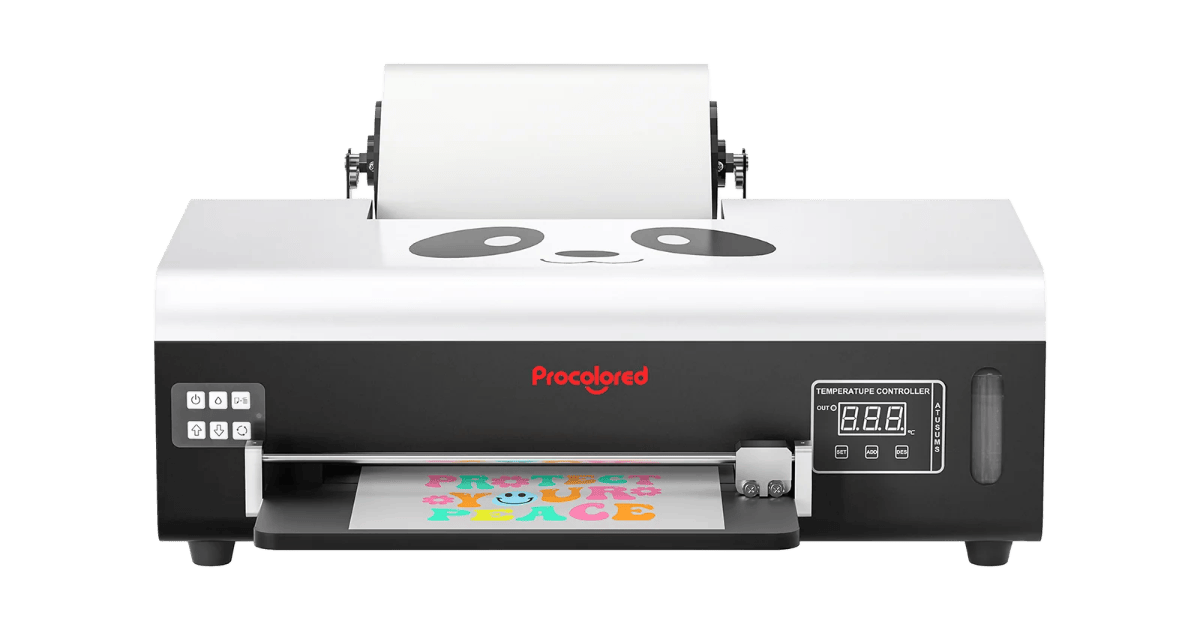
Our Procolored F13 Panda review covers real-world specs, pros & cons, inks, workflow, costs, and setup tips—so you can decide if this compact 13″ (A3) DTF fits your shop.
Procolored F13 Panda Review (A3 / 13″ Direct-to-Film Printer)

📋 Key Specifications — Procolored F13 Panda (A3)
| Manufacturer | Procolored |
| Printhead | L1800 single head |
| Max Resolution | Up to 1440-class modes (vendor family spec) |
| Max Print / Media Width | ≈ 12.95–13.0″ (A3 roll & sheets) |
| Media Feed | Sheets & rolls; upgraded roller feeder |
| White Ink Handling | White-ink circulation to reduce clogs |
| Auto Maintenance | Auto clean every 10 h when powered on (~1 ml/day) |
| Extras | Some bundles add preheating, film adsorption, and ink collection |
| Software / OS | Windows-only workflow with bundled RIP (per vendor pages) |
Facts from Procolored’s F13 product pages & reseller listings (auto-clean timing/consumption, white-ink circulation, roller feeder, A3 rolls, Windows-only workflow). :contentReference[oaicite:1]{index=1}
The F13 focuses on accessibility: roll printing up to 13″ wide, a more stable white channel via circulation, and hands-off upkeep every 10 hours. Throughput is entry-class and macOS users will need a PC, but it’s a practical A3 starter. :contentReference[oaicite:2]{index=2}
✅ Reasons to Buy
- Accepts both rolls and sheets up to 13″ wide—better for small gang sheets. :contentReference[oaicite:3]{index=3}
- White-ink circulation helps reduce clogging & extend head life. :contentReference[oaicite:4]{index=4}
- Auto-clean every 10 h (≈1 ml/day) keeps the head active between batches. :contentReference[oaicite:5]{index=5}
- Upgraded roller feeder to minimize jams compared with older A3 units. :contentReference[oaicite:6]{index=6}
❌ Reasons to Avoid
- Entry-class speed; optimize passes vs coverage for dense whites.
- Windows-only workflow; Mac users need a PC/RIP bridge. :contentReference[oaicite:7]{index=7}
- Feature set varies by bundle (preheat/adsorption on some SKUs). :contentReference[oaicite:8]{index=8}
🔍 Performance Analysis — Procolored F13 Panda review
Roll support at 13″ lets you run compact gang sheets more efficiently than single-sheet devices. White circulation and timed auto-clean reduce idle-time purges and recoveries; combine with humidity control (40–60% RH) and quick nozzle checks to limit scrap. Optional preheating/film adsorption (where bundled) steadies laydown for dense whites. :contentReference[oaicite:9]{index=9}
🔗 Connectivity, RIP & Workflow — Procolored F13 Panda review
The bundled Windows RIP handles mirror/white logic and hot-folder queues. Standardize film presets and heater targets per SKU, and log ink/film by job to refine true cost per print. If you plan frequent weekend pauses, leave the unit powered for scheduled cleans or follow vendor storage steps to avoid Monday purges. :contentReference[oaicite:10]{index=10}
💰 Running Costs & Uptime — Procolored F13 Panda review
White coverage is the cost lever. The F13’s auto-clean (10 h) and circulation mitigate clogs typical of entry A3 units; keep consumable SKUs consistent and assess a “white coverage surcharge” for heavy designs to protect margins. :contentReference[oaicite:11]{index=11}
🎯 Who Should Buy It? — Procolored F13 Panda review
Choose the F13 Panda if you’re starting DTF, selling short runs, or need a portable 13″ line for logos, chest prints, and labels. If you routinely batch large gang sheets or dark-shirt backs, consider moving up to 24–35″ devices for speed.
❓ FAQs — Procolored F13 Panda review
Does it print from rolls?
Yes—F13 supports rolls and sheets up to 13″, with an upgraded roller feeder to reduce jams. :contentReference[oaicite:12]{index=12}
How is white ink managed?
It uses white-ink circulation to keep the white channel active and reduce clogging between jobs. :contentReference[oaicite:13]{index=13}
What about maintenance?
If left powered on, the printer performs auto cleaning every 10 hours using about 1 ml/day of ink, per vendor. :contentReference[oaicite:14]{index=14}
Is it Mac compatible?
Workflow is Windows-only with the included RIP on F13 pages; Mac users will need a Windows workstation. :contentReference[oaicite:15]{index=15}